
Download Should I Remove It? – remove programs, uninstall software, clean computer, optimize hard drive, system performance
Overview
Should I Remove It? is a utility application designed to assist users in managing installed software on their Windows devices. Its primary purpose is to evaluate the programs currently installed on a computer and provide data-driven recommendations on which ones may be safely uninstalled. By leveraging a large database of user experiences, the app helps users identify software that is rarely used, poorly rated, or frequently removed by others. This functionality supports the optimization of hard drive space and contributes to improved system performance. The application is especially useful for individuals seeking to declutter their systems, whether due to storage limitations or the desire for a faster, more responsive computing environment.
Target users include general computer users, tech-savvy individuals, and those managing multiple devices. It serves as a practical tool for anyone looking to maintain a clean and efficient system without relying on guesswork. The app is developed by The AppGuru, LLC, a company known for creating utility-focused software solutions. Although specific details about the developer’s broader portfolio were not provided, the application’s long-standing presence since its release in 2013 indicates a stable and maintained product. Real-world use cases include preparing a device for resale, freeing up space before installing new software, or simply improving overall system responsiveness.
Within the broader ecosystem of system maintenance tools, Should I Remove It? fills a niche by combining user-based insights with direct uninstall functionality. It stands out from basic control panel tools by offering contextual intelligence rather than raw data alone. The app does not require advanced technical knowledge, making it accessible to a wide audience. While the developer did not provide additional technical details, the app’s enduring relevance suggests consistent updates and reliability over time.
Key Features & Functionality
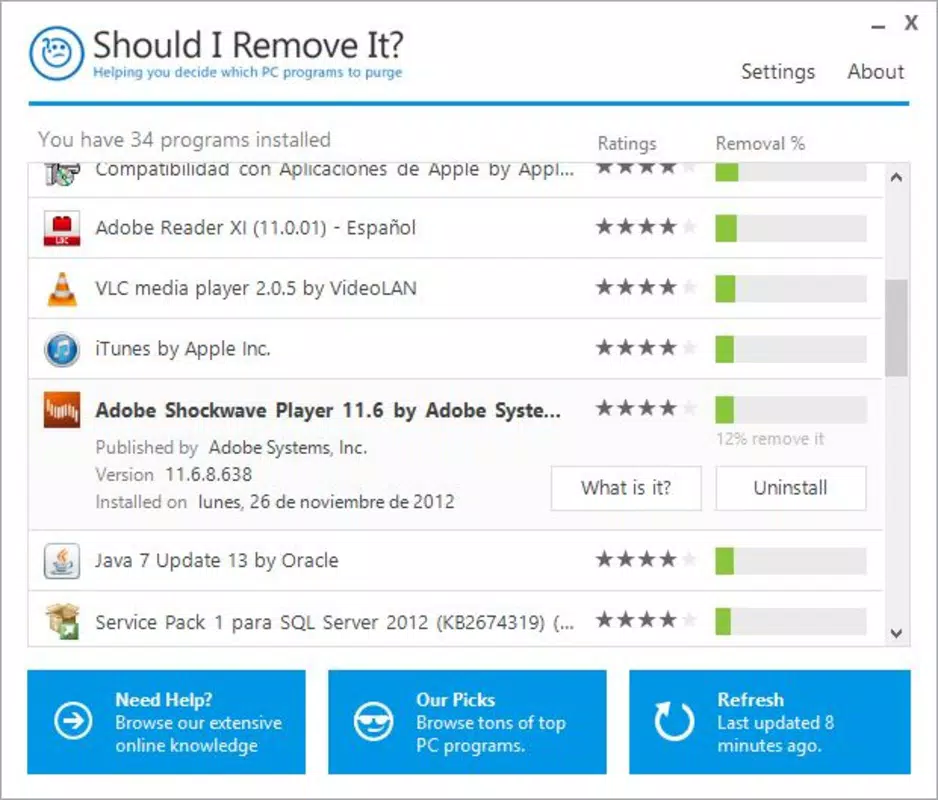
- User-Based Recommendations: The app analyzes the percentage of users who have uninstalled each program, offering a statistical insight into a software’s perceived value. This feature enables users to make informed decisions based on community behavior rather than assumptions.
- Direct Uninstallation: Users can initiate the removal of selected programs directly within the application, eliminating the need to navigate to Windows’ built-in uninstaller or program settings.
- Information on Unknown Programs: For unfamiliar software, the “What is it?” feature provides access to detailed information, including functions, installed files, and user statistics, empowering users to evaluate risks and benefits.
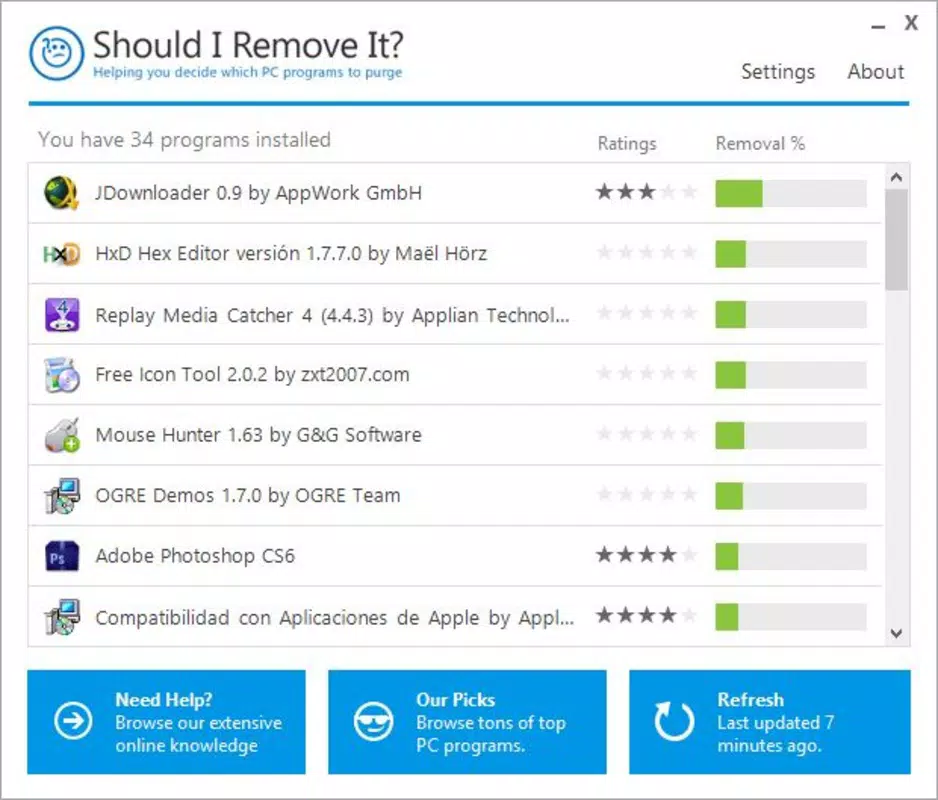
- Intuitive Interface: Programs are displayed in order of their likelihood to be uninstalled, helping users quickly identify low-priority or redundant software.
- Hard Drive Optimization: By recommending unnecessary programs for removal, the app supports efficient storage management and contributes to smoother system operation.
These features work together to streamline the cleanup process. For example, a user encountering an unfamiliar program can instantly access its background and popularity data, reducing the risk of accidental removal of critical software. Similarly, someone preparing a device for resale can use the app to identify and remove unused or outdated programs in a systematic way. The direct uninstallation capability saves time and minimizes navigation across multiple system menus.
Interface, UX & Performance
Should I Remove It? features a clean and minimal interface designed around clarity and efficiency. Programs are listed in a structured format, typically sorted by uninstall likelihood, which allows users to prioritize actions based on data. The visual style is functional, with minimal distractions, focusing attention on the list and actionable options. Navigation is straightforward, with clear buttons for viewing details, initiating removal, or accessing additional information.
Although the developer did not list formal performance metrics, the app’s lightweight footprint of 11.2 MB suggests it operates efficiently without consuming significant system resources. Users can expect responsive interactions across a range of device categories, from older machines to modern systems. The application does not appear to introduce lag or instability during scanning or uninstallation processes. However, compatibility with specific hardware configurations was not fully disclosed.
Stability appears to be a consistent strength, supported by the app’s long release history. The user experience is designed to be non-intimidating, even for those unfamiliar with system-level operations. The inclusion of a help feature for unknown programs enhances usability and reduces user anxiety. Overall, the interface balances simplicity with functionality, making it suitable for both novice and experienced users.
Platform Compatibility & Technical Requirements
Should I Remove It? is designed for the Windows platform. The current version is 1.1.0.0, with a file size of 11.2 MB. The app is available at no cost, with a price of $0.00. While the developer did not specify minimum OS requirements, the application has been in use since 2013, indicating compatibility with multiple versions of Windows over time.
Specific requirements such as RAM, processor speed, or supported Windows editions were not listed. The developer did not provide additional technical details regarding installation prerequisites or system dependencies. Compatibility information was not fully disclosed, so users should verify system compatibility before installation. Despite this, the app’s lightweight design suggests broad compatibility across modern and legacy Windows environments.
Pros and Cons
- Provides data-driven recommendations based on user behavior
- Enables direct uninstallation without navigating system settings
- Offers detailed insights into unknown programs
- Lightweight with minimal system impact
- Free to download and use
- Compatibility with specific Windows versions was not disclosed
- No visible update notifications or changelog access
- Interface lacks advanced filtering or customization options
- Developer did not provide detailed technical specifications
- May not support newer Windows features or security protocols
FAQ
Is Should I Remove It? safe to use?
The application is designed to analyze installed programs and recommend removals based on user data. It does not modify system files without user consent. However, users should always review recommendations before proceeding with uninstalls.
Can I use this app on older versions of Windows?
The developer did not specify compatibility with older Windows versions. However, given its release date in 2013, it may function on systems like Windows 7 or 8. Testing on target systems is recommended.
Does the app require an internet connection?
Yes, the app requires an internet connection to access the database of user experiences and to retrieve information about unknown programs. Offline functionality is not available.
How often does the app update its recommendations?
Specific update frequency was not provided. Recommendations are based on the latest data available in the user database, but the app does not display a changelog or update schedule.
Can I reinstall a program after removing it with this app?
Yes, programs removed via Should I Remove It? can be reinstalled from their original source or installation media. The app does not permanently block reinstallation.
Final Thoughts
Should I Remove It? remains a valuable tool for users seeking to maintain a clean and efficient Windows environment. Its ability to deliver actionable, community-backed insights into software utility sets it apart from basic uninstallers. The direct removal feature and support for unknown program identification enhance usability and reduce decision fatigue. While the app lacks detailed technical documentation and modern interface enhancements, its core functionality remains effective and reliable.
It is particularly beneficial for individuals managing multiple devices, preparing systems for sale, or simply aiming to free up space and improve performance. The free price point adds to its accessibility. For users who value simplicity, data-driven decisions, and system optimization, Should I Remove It? delivers tangible value.
Download Should I Remove It? now


